Tracing write syscall on a high level
Ever call f.write() in Python and wonder what actually hits the metal.
er call f.write() in Python and wonder what actually hits the metal. Lets say you are writing a python function which involves writing to a file. Do you wonder what happens on a kernel level when writing that function. Lets trace a function call as it goes through to the kernel level
Pre-requisites
User space and kernel space: Linux runs applications in two modes, one is the kernel mode which is the most privileged in terms of permissions and the user mode which is the least privileged. System calls run in kernel mode is something that is an important pre-req to understanding how they trace
Traps: There is something called as a trap in a linux kernel. This is kind of like a synchronous CPU exception where we transfer control from the user space to the kernel space. These are different from interrupts are asynchronous and come from hardware
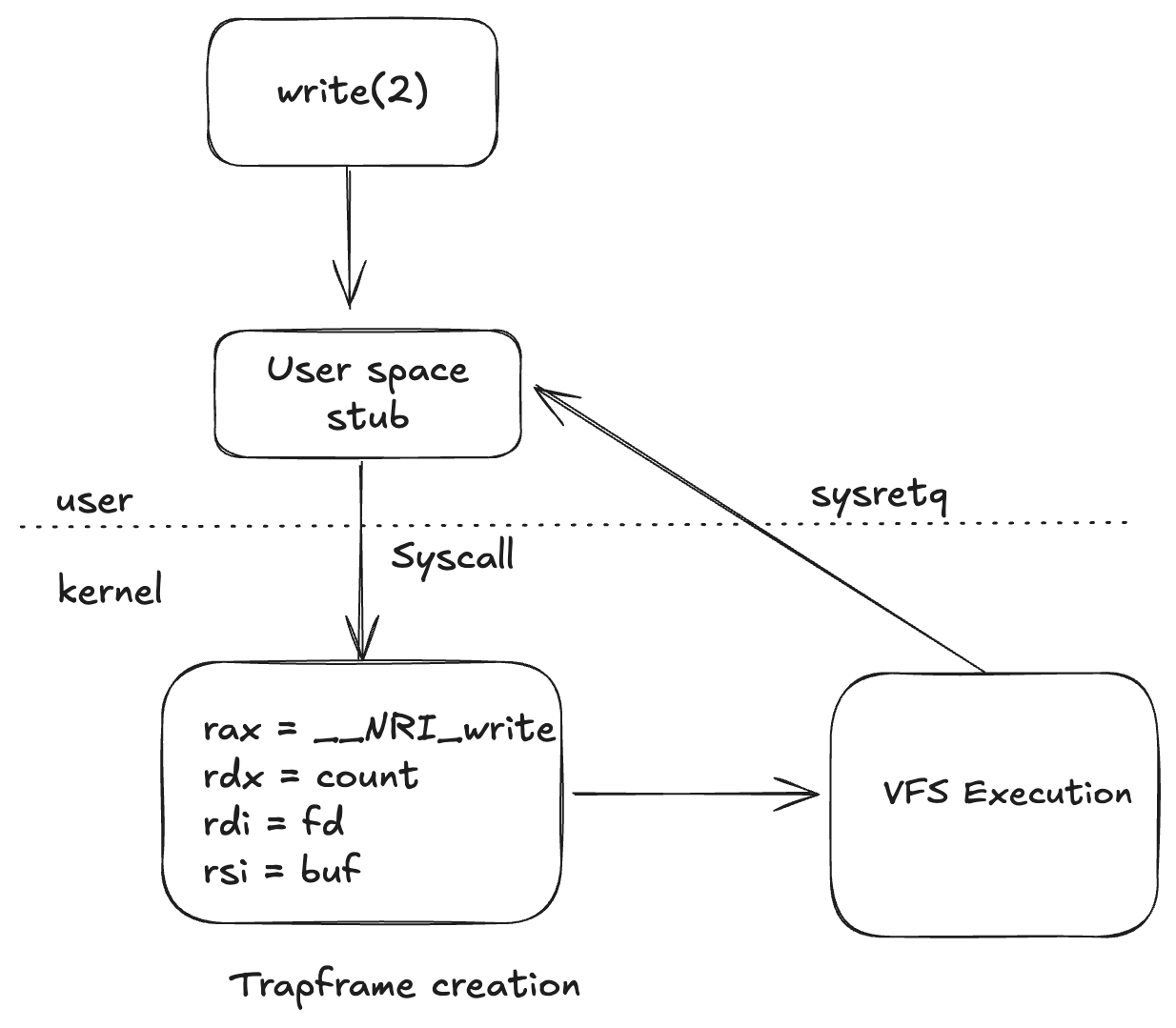
Step 1: Transfer from a user space to a kernel space
One boundary worth naming first: Python file objects are buffered, so f.write() may only copy your bytes into a userspace buffer. The trace below starts at the moment that buffer is flushed and the write() call actually happens. When Python makes the write() call, it calls into a libc `write` wrapper which loads the syscall number and the values into registers (this trace follows the x86-64 path) and then executes the syscall. This point is the main transfer interface to a kernel level space.
Step 2: Trapframe and copying of user register
On entry, the kernel saves user registers into pt_regs (the trapframe) so it can return or deliver signals later. This is basically a snapshot of the user context. It generates this so that it can restart syscalls if needed, return to the user context if needed, or deliver signals
Step 3: Execution of the syscall and returns control
We now have all the steps in place, the kernel then executes the appropriate syscall after reading from rax and then calls the —x64_sys_write. This then resolves to vfs_write which is the virtual file system call. Now it needs to copy the buffers and does so with (copy_from_user). With all the values it requires and then writes the buffer at the correct position. Once that is complete it returns control using sysretq and puts the return value back in rax. And one more boundary at the end: a successful write() means the kernel accepted your bytes into the page cache — it does not mean they reached the disk. Durability is a separate step (fsync), and that is a rabbit hole for another post.
Note: This is just a high level trace of the write system call and there is a lot of depth to be covered, but its a great introduction to understanding the execution of a syscall.